Cloud Deployment Models: Types, Benefits, and Examples
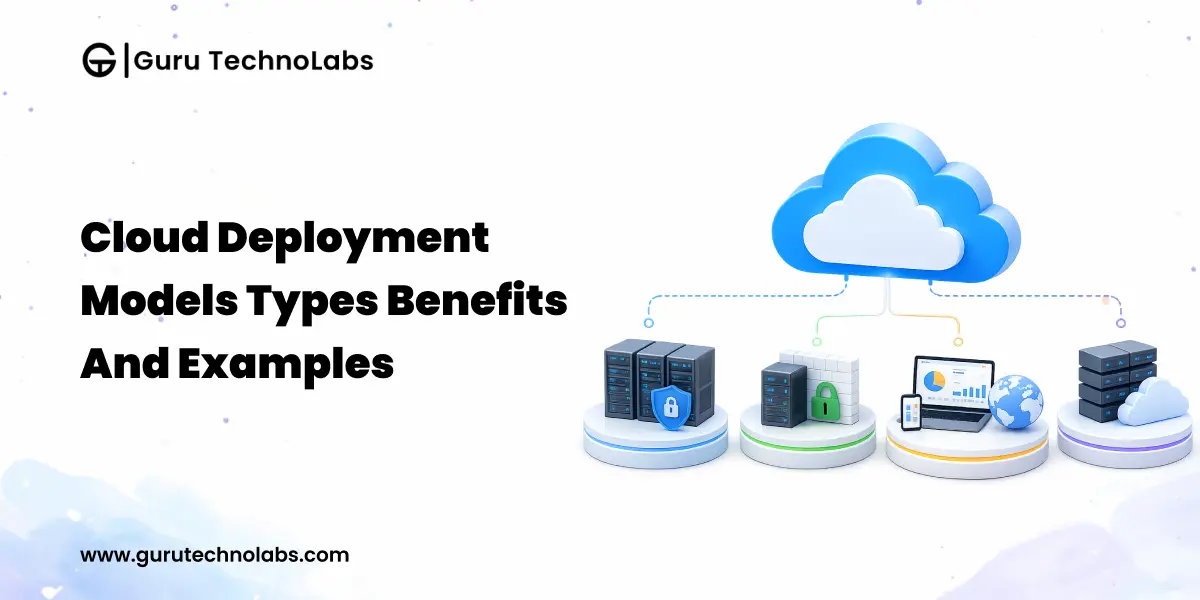
Table of Contents
Every cloud strategy starts with one foundational decision: where will the infrastructure live, who will control it, and how will it scale? Get this right, and everything downstream becomes easier to manage. Get it wrong, and the consequences compound for years.
Consider a mid-size financial services company that spent 14 months migrating to a public cloud, only to reverse course after a compliance audit flagged gaps in data residency controls. The technology worked fine. The deployment model did not fit their regulatory reality.
This is not an uncommon story. Most enterprises don’t fail at cloud adoption because they pick the wrong provider. They fail because they pick the wrong deployment model for their workload reality and then spend years working around that decision.
This guide offers a structured way to evaluate cloud deployment models against real business constraints: regulatory exposure, integration complexity, workload variability, and the long-term cost of control.
What Are Cloud Deployment Models?
A cloud deployment model defines how cloud infrastructure is provisioned, who owns it, where it physically resides, and who is allowed to access it.
It is the foundational layer underneath every other cloud decision.Before you choose between IaaS, PaaS, or SaaS, see our breakdown of SaaS vs PaaS vs IaaS for that service-model context you first need to answer who owns the infrastructure your workloads will run on.
The deployment model in cloud computing determines:
- Where your data physically lives and which jurisdictions govern it
- Who has root-level access to the underlying hardware
- How much can you customize the security posture
- How elastic your capacity actually is
- What your unit economics look like at scale
Get this layer right, and most downstream decisions become straightforward. Get it wrong, and you will be re-architecting under pressure within two years.
Why Choosing the Right Cloud Model Matters
Choosing the right cloud deployment model has a direct impact on security, cost, scalability, and long-term agility. The real cost of a poor decision is rarely the migration itself; it is the slower product delivery, compliance rework, rising infrastructure spend, and architectural limitations that build over time.
The wrong cloud computing deployment model can affect:
- Security posture: Whether sensitive data is stored in a shared environment or an isolated infrastructure. This often depends on architecture choices such as multi-tenant vs single-tenant SaaS models.
- Compliance readiness: How quickly and efficiently you can meet SOC 2, HIPAA, GDPR, RBI, or PCI-DSS requirements.
- Infrastructure economics: The balance of OpEx vs CapEx and how costs increase as workloads grow.
- Time to market: The speed of provisioning, deployment, scaling, and disaster recovery.
- Operational overhead: How much engineering time is spent managing infrastructure instead of building products.
- Disaster recovery profile: Your RTO and RPO performance during real outage scenarios.
The financial stakes here are not abstract. According to the Flexera 2026 State of the Cloud Report, 76% of large enterprises now spend over $5 million a month on cloud, so at that scale, a poorly chosen deployment model doesn’t just cause friction; it compounds into real money every month it goes uncorrected.
For growth-stage businesses, the wrong model often becomes a slow-moving problem: higher monthly costs, growing security risks, and workloads that become harder to scale. By the time these issues are visible, changing course is usually more expensive and complex.
Main 4 Types of Cloud Deployment Models

There are four common cloud deployment models in active enterprise use today:
- Public cloud – Third-party, multi-tenant infrastructure consumed over the internet.
- Private cloud – Single-tenant infrastructure dedicated to one organization.
- Hybrid cloud – Private and public environments combined with controlled workload portability.
- Community cloud – Shared infrastructure for organizations with common compliance needs.
Each represents a different trade-off between control, cost, and elasticity.
The question is rarely “which is best?” It is “which is best for this specific workload, given our compliance, scale, and integration constraints?”
1. Public Cloud
The public cloud deployment model is owned and operated by a third-party provider that delivers compute, storage, and networking over the internet on a multi-tenant basis. You consume resources; the provider handles everything underneath.
It is the most commonly used cloud deployment model and the default choice for net-new workloads. The economics, automation, and global reach are genuinely hard to replicate in-house.
Advantages of Public Cloud
- Zero capital expenditure on hardware; pure OpEx model
- Near-instant provisioning and global reach across regions
- Elastic scaling that absorbs unpredictable traffic without capacity planning
- Managed services that compress engineering timelines
- Maintenance, patching, and physical security are handled by the provider
Disadvantages of Public Cloud
- Limited visibility into the underlying infrastructure
- Shared-tenant concerns for highly regulated workloads
- Egress and storage costs that compound silently at scale
- Vendor lock-in around proprietary managed services
- Compliance constraints in jurisdictions with strict data residency rules
Use Cases of Public Cloud
- SaaS platforms with global users and unpredictable load curves
- Web and mobile applications with elastic traffic patterns
- Development, testing, and staging environments
- Backup, archival, and disaster recovery targets
- Data analytics workloads benefiting from managed pipelines
Public Cloud Deployment Examples
The major public cloud providers are AWS, Microsoft Azure, Google Cloud Platform, and Oracle Cloud Infrastructure.
A typical public cloud deployment model example: a B2B SaaS company running its entire stack on AWS compute on EC2, storage on S3, primary database on RDS, with CloudFront handling global delivery. The team scales automatically and pays only for what it uses.
2. Private Cloud
The private cloud deployment model dedicates the entire infrastructure stack to a single organization. It can be hosted in your own data center, in a colocation facility, or by a third-party provider on dedicated hardware.
The defining trait isn’t where it lives; it is that you control the tenancy. This is why a business that wants to leverage cloud computing while retaining full control over security, compliance, and infrastructure management lands on a private cloud. A single-tenant stack means you own hardware, network segmentation, encryption, and key management end to end, with no shared-tenant exposure. If only a subset of your workloads truly needs that level of control, a hybrid cloud is often the more economical way to apply it selectively.
Advantages of Private Cloud
- Complete control over hardware, networking, and security configuration
- Strong fit for strict regulatory frameworks and data residency requirements
- Predictable performance with no noisy-neighbor effects
- Custom security architectures and air-gapped deployments are possible
- Aligns with long-lived workloads where TCO favors ownership
Disadvantages of Private Cloud
- High upfront capital expenditure and longer procurement cycles
- Requires mature infrastructure, security, and SRE teams in-house
- Slower elasticity, you cannot scale beyond provisioned capacity
- Disaster recovery and geographic redundancy demand significant investment
- Hardware refresh cycles add ongoing complexity
Use Cases of Private Cloud
- Core banking and trading platforms with strict latency and audit requirements
- Healthcare systems handling protected health information
- Government and defense workloads with sovereignty mandates
- Enterprise ERP systems and large internal data warehouses
- IP-sensitive R&D environments
Private Cloud Deployment Examples
A private cloud deployment model example often involves VMware Cloud Foundation, Nutanix, or IBM Cloud running on-premises or in colocation. Open-source stacks like OpenStack are also widely deployed.
A common private deployment model in cloud computing: a national bank running its core banking platform on a VMware-based private cloud, with controlled segmentation, dedicated HSMs, and an internal platform team operating it.
3. Hybrid Cloud
The hybrid cloud deployment model combines a private cloud (or on-premises infrastructure) with one or more public clouds, with orchestration that allows workloads, data, and identity to move between them in a controlled way.
It is the model most growth-stage enterprises actually end up running, not always by design, but because reality demands it. The most common trigger is regulatory: when regulated data or specific workloads must stay on-premises while the rest of the business still needs cloud elasticity, hybrid lets you keep those sensitive systems behind your own controls while running everything elastic in the public cloud. Done well, that split is deliberate rather than accidental, governed by unified identity and orchestration, not left to chance.
Advantages of Hybrid Cloud
- Sensitive workloads stay private while elastic workloads use public cloud
- Burst capacity to the public cloud during traffic spikes without overprovisioning private
- A practical migration path for organizations with a significant legacy estate
- Better disaster recovery using public cloud as a secondary region
- Flexibility to optimize each workload for its actual constraints
Disadvantages of Hybrid Cloud
- Architectural complexity is significantly higher than a single-environment design
- Network latency between environments must be designed for, not assumed
- Security policy drift between the private and public sides is a constant risk
- Operational maturity required is higher than most organizations estimate
- Cost optimization requires active workload placement decisions
Use Cases of Hybrid Cloud
- Ecommerce platforms with private order/payment systems and public-facing storefronts
- Enterprises modernizing legacy systems while keeping core workloads on-premises
- Seasonal businesses needing burst capacity during peak periods
- Organizations with strict data residency for some datasets but not others
- Multi-location enterprises consolidating regional IT into a unified architecture
Hybrid Cloud Deployment Examples
A retail enterprise running its PCI-scoped payment systems in a private cloud while serving its storefront and recommendation engine from AWS is a textbook hybrid cloud deployment model example. Another: a manufacturer keeping its ERP on-premises while running analytics and IoT pipelines on Azure.
If you are planning to migrate legacy systems to the cloud, hybrid is almost always the realistic intermediate state and often the long-term destination.
Planning a Hybrid Cloud Architecture?
Hybrid cloud success depends on workload placement, identity design, and governance not just provider choice. Get expert guidance to build a secure, scalable, and future-ready cloud environment.
4. Community Cloud
The community cloud deployment model is a shared infrastructure for a group of organizations with common regulatory, compliance, or operational requirements. It sits between private and public multi-tenancy, but with tenants who share the same governance constraints.
It is the least common of the four, but for the industries it fits, it fits very well.
Advantages of Community Cloud
- Shared infrastructure costs across participating organizations
- Compliance and security baselines tuned for the specific industry
- Native data sharing and collaboration between aligned organizations
- Stronger isolation than public cloud without full private cloud cost
- Shared governance reflecting industry-specific norms
Disadvantages of Community Cloud
- Less elasticity than hyperscale public clouds
- Decision-making slows when multiple stakeholders share governance
- Smaller managed-service ecosystem than the major public clouds
- Limited geographic reach in most cases
Use Cases of Community Cloud
- Government inter-agency platforms with shared classification standards
- Healthcare consortia exchanging research and patient data under HIPAA
- University and research network platforms
- Financial industry utilities for shared regulatory reporting
Community Cloud Deployment Examples
Examples include AWS GovCloud (community-style isolation for U.S. government workloads), healthcare research platforms shared across hospital networks, and university consortium clouds for academic computing.
Comparison of Cloud Deployment Models
| Dimension | Public Cloud | Private Cloud | Hybrid Cloud | Community Cloud |
|---|---|---|---|---|
| Upfront Cost | Very low | High | Medium–High | Medium |
| Long-term Cost | The variable can spike at scale | Predictable | Moderate, requires optimization | Shared, predictable |
| Security Control | Provider-defined | Full control | Workload-dependent | Industry-aligned |
| Customization | Low | High | High | Medium |
| Scalability | Near-infinite | Bound by capacity | Elastic via public side | Bound by community capacity |
| Compliance Fit | Strong with managed services | Strongest for strict regimes | Strong if architected well | Strong for industry-specific |
| Operational Overhead | Low | High | Highest | Medium |
| Best For | Elastic, modern workloads | Regulated, predictable workloads | Mixed estates, modernization | Industry-aligned consortia |
This comparison of types of cloud deployment models is a starting point, not a verdict. The right model depends on workload-level realities, not company-level averages.
Common Cloud Deployment Model Mistakes Businesses Make
Choosing Based Only on Sticker Price
The cheapest cloud deployment model on day one is rarely the cheapest at year three. Egress costs, managed-service premiums, and re-architecture costs all surface later. Evaluate three-year TCO against realistic workload growth.
Underestimating Data Gravity
Once your data sits in a particular cloud, every other workload tends to follow. Decide where your primary data lives with the long view in mind. Moving terabytes across providers is rarely cheap, fast, or risk-free.
Treating Compliance as a Checkbox
Provider compliance certifications don’t make your workload compliant. The shared responsibility model means your configuration, access controls, and data handling determine actual compliance. This is where most challenges of integrating legacy systems with cloud platforms originate.
Skipping the Workload Inventory
Picking a deployment model before classifying workloads by sensitivity, latency, and integration depth almost always leads to rework. Inventory first, decide second.
Ignoring the Operating Model
A hybrid architecture demands hybrid operations unified identity, observability, and policy. Without it, you have not built a hybrid cloud; you have built two silos that happen to share a network.
Avoid Costly Cloud Migration Missteps
Most cloud migration issues start before the first workload moves. A workload-level assessment helps reduce risk, avoid costly rework, and identify integration challenges early.
How to Choose the Right Cloud Deployment Model
A defensible deployment model decision comes from answering a structured set of questions, not from picking a default.
Workload classification
- Which workloads handle regulated, sensitive, or sovereign data?
- Which are latency-sensitive versus tolerant?
- Which have predictable versus elastic demand patterns?
Compliance and risk
- What regulatory regimes apply, and what are their data-residency mandates?
- What are your audit, logging, and key management requirements?
- What is your tolerance for shared-tenant exposure?
Economic profile
- Is OpEx or CapEx more aligned with your finance posture?
- What does three-year TCO look like under realistic growth?
- How sensitive are you to egress and managed-service pricing?
Operational readiness
- Do you have the SRE and security maturity to operate hybrid?
- Can your team consume managed services effectively, or will it reinvent them?
Strategic direction
- Are you modernizing legacy systems or building greenfield?
- How important is provider portability over a five-year horizon?
A structured cloud migration strategy starts with workload-level analysis before vendor selection, deployment model before service model.
Conclusion
Cloud deployment models are a strategic architecture decision, not just a procurement choice. Public cloud offers agility and rapid scalability. Private cloud provides greater control and security. Hybrid cloud reflects how many modern enterprises balance legacy systems with innovation. Community cloud supports industries that require shared governance and compliance standards.
The best approach is rarely a one-size-fits-all model. It is a workload-based strategy that places each application, dataset, and process in the environment where it performs best. When businesses choose the right deployment model at the workload level, cloud operations become more efficient, secure, and cost-effective.
Making the right decision requires careful planning, including workload assessment, compliance analysis, three-year TCO forecasting, and operational readiness. Partnering with an experienced cloud consulting company can help you avoid costly mistakes, accelerate migration, and build a cloud strategy designed for long-term growth. Done right, the right deployment model creates a strong foundation for years of scalability and innovation.
Build a Deployment Model That Holds Up at Scale
Whether you are modernizing legacy systems or designing greenfield architecture, the right deployment strategy starts with rigorous workload analysis and compliance mapping.
Frequently Asked Questions
A cloud deployment model defines how cloud infrastructure is provisioned, owned, hosted, and accessed. It determines tenancy, control, security posture, and economic profile. The four common cloud deployment models are public, private, hybrid, and community cloud.
There are four widely recognized types of cloud deployment models: public cloud, private cloud, hybrid cloud, and community cloud. Some frameworks refer to multi-cloud as a fifth pattern, though it is better understood as a strategy spanning multiple deployment models.
Private cloud generally offers the strongest security posture because the organization controls every layer. However, hybrid and community clouds can match private cloud security for specific workloads when architected with strict isolation, key management, and continuous monitoring.
A hybrid cloud combines private and public environments with workload portability between them. Multi-cloud means using more than one public cloud provider, with or without integration. Many enterprises run both a hybrid for legacy and a multi-cloud for resilience.
Most growth-stage and large enterprises end up on a hybrid cloud because it accommodates legacy systems, regulatory constraints, and modernization simultaneously. The right choice depends on workload mix, compliance scope, and operational maturity not company size alone.
Companies use hybrid cloud to keep sensitive workloads under tight control while running elastic, customer-facing workloads on public cloud. It offers a practical middle path through legacy modernization, regulatory pressure, and unpredictable demand.
The main characteristics of a hybrid cloud deployment model include a mix of private and public cloud environments, workload portability, centralized management, flexible scalability, stronger security control, and the ability to place workloads based on business needs.
Hybrid cloud is growing fast in 2026 because businesses need a balance of security, flexibility, and scalability. It allows companies to keep sensitive workloads in private environments while using public cloud resources for innovation and growth.
The public cloud is usually the most economical option upfront because there is no need to buy and maintain physical infrastructure. You pay for the resources and services you use, which makes it a practical choice for businesses that want to avoid large capital investments. That said, the lowest initial cost does not always mean the lowest long-term cost. As workloads grow, expenses such as data transfer, storage, and managed services can add up. Private, hybrid, or community cloud models may make more financial sense for organizations with predictable workloads or specific infrastructure requirements.
A good example of a private cloud is a bank running its core banking applications on dedicated infrastructure using platforms such as VMware Cloud Foundation, Nutanix, or OpenStack. The infrastructure may be hosted in the bank's own data center or in a colocation facility, but it is reserved for that organization. For example, a bank might use a VMware-based private cloud with dedicated security controls, network segmentation, and hardware security modules (HSMs). The key difference is that the underlying cloud environment is dedicated to and controlled by a single organization, rather than being shared with other customers.