Step-By-Step Cloud Migration Checklist For Effective Planning
Table of Contents
- What Is a Cloud Migration Checklist?
- Why Businesses Need a Cloud Migration Checklist
- Pre-Migration Cloud Checklist for Successful Cloud Planning
- Cloud Security and Compliance Checklist
- Cloud Data Migration Checklist for Secure and Accurate Transfer
- Cloud Application Migration Checklist
- Cloud Migration Execution Checklist
- Post Migration Cloud Checklist
- Common Cloud Migration Mistakes to Avoid
- Best Practices for Successful Cloud Migration Planning
- Quick Cloud Migration Checklist Summary
- Final Thoughts
- FAQs
Cloud migration is now a critical part of business modernization, helping organizations improve scalability, reduce infrastructure limitations, and support faster innovation. But despite better cloud platforms and migration tools, many projects still struggle to deliver the expected results.
Research from Gartner shows cloud migration is the second-highest IT priority for CIOs in 2026, just behind cybersecurity. By 2028, nearly 75% of enterprise workloads are expected to run in cloud or edge environments, up from 52% in 2024.
The biggest challenge is not the technology itself. Poor planning, unclear priorities, and overlooked dependencies are some of the main reasons cloud migrations become delayed, expensive, or difficult to manage.
A structured cloud migration checklist helps reduce these risks by giving teams a clear framework for planning, execution, security, and post-migration optimization. This guide covers the key steps businesses should follow to migrate workloads more efficiently, minimize disruption, and avoid costly mistakes.
Cloud Migration Checklist: Quick Overview
Before you begin your cloud migration, take a moment to review the essentials. If you can confidently check off each of the points below, you’re starting from a much stronger position and are less likely to encounter costly surprises later in the project.
- You have clearly defined your cloud migration goals, scope, timeline, and expected business outcomes.
- Your existing infrastructure, applications, databases, and system dependencies have been assessed and documented.
- A cloud readiness assessment has been completed to identify technical gaps and migration risks.
- You’ve selected the cloud environment and service provider that best fit your business, security, and compliance requirements.
- Security controls, compliance requirements, backup plans, and disaster recovery strategies are in place.
- Your data has been cleaned, validated, and prioritized for migration.
- Critical applications have been tested for compatibility, performance, and integration with the target cloud environment.
- A pilot migration and rollback plan has been prepared before moving business-critical workloads.
- You have a plan to monitor performance, optimize cloud costs, and strengthen security after the migration is complete.
Expert Tip: A cloud migration checklist shouldn’t be something you use only once. Revisit it throughout the planning, migration, and post-migration phases to make sure nothing important is overlooked as your project evolves.
What Is a Cloud Migration Checklist?
A cloud migration checklist is a structured framework of tasks, validations, and planning steps used to guide a business through the cloud migration process. It helps teams organize everything from infrastructure assessment and security planning to workload migration, testing, and post-migration optimization.
Think of it as an operational roadmap for migration execution. While a cloud migration strategy focuses on business goals, migration approach, and long-term planning, the checklist focuses on the practical steps required to move systems, applications, and data successfully.
A well-planned checklist helps teams stay aligned, reduce operational risks, avoid missed dependencies, and maintain business continuity throughout the migration process. It also creates a more predictable migration experience by ensuring every critical area is reviewed before workloads move to the cloud.
Why Businesses Need a Cloud Migration Checklist
Cloud migration involves far more than moving applications from on-premises infrastructure to the cloud. Teams must manage infrastructure dependencies, security configurations, compliance requirements, workload sequencing, budgeting, testing, and operational continuity at the same time. Without a structured checklist, important steps are often missed, increasing the risk of downtime, security gaps, unexpected costs, and migration delays.
Helps Reduce Downtime
A structured cloud migration checklist helps teams move workloads in the correct order while identifying dependencies in advance. This reduces service interruptions and helps critical business applications remain available during migration.
Improves Migration Planning
Organizations that conduct formal cloud readiness assessments before migration tend to achieve significantly higher success rates. A checklist helps teams define priorities, identify technical gaps, assign responsibilities, and create a more realistic migration timeline before execution begins.
Prevents Data Loss
Data transfer is one of the highest risk areas during migration. Validation procedures, backup planning, and integrity checks help ensure critical business data remains accurate, complete, and recoverable throughout the migration process.
Enhances Security and Compliance
Security issues often appear when access controls, encryption standards, or compliance requirements are addressed too late in the project. A cloud migration security checklist helps teams review identity management, data protection policies, regulatory obligations, and monitoring requirements before workloads go live.
Improves Cost Control
Many cloud migrations exceed initial budgets because businesses underestimate infrastructure dependencies, storage growth, licensing costs, or resource usage after migration. A checklist helps teams plan capacity more accurately, monitor spending early, and avoid unnecessary cloud waste.
Supports Business Continuity
Unexpected issues can still happen even with careful planning. Backup strategies, rollback procedures, and disaster recovery planning help businesses maintain operational continuity if applications, integrations, or workloads fail during migration.
A cloud migration checklist is not just a planning document. It creates structure, improves coordination across teams, and helps businesses reduce operational risk while moving toward a more scalable and flexible infrastructure environment.
Pre-Migration Cloud Checklist for Successful Cloud Planning
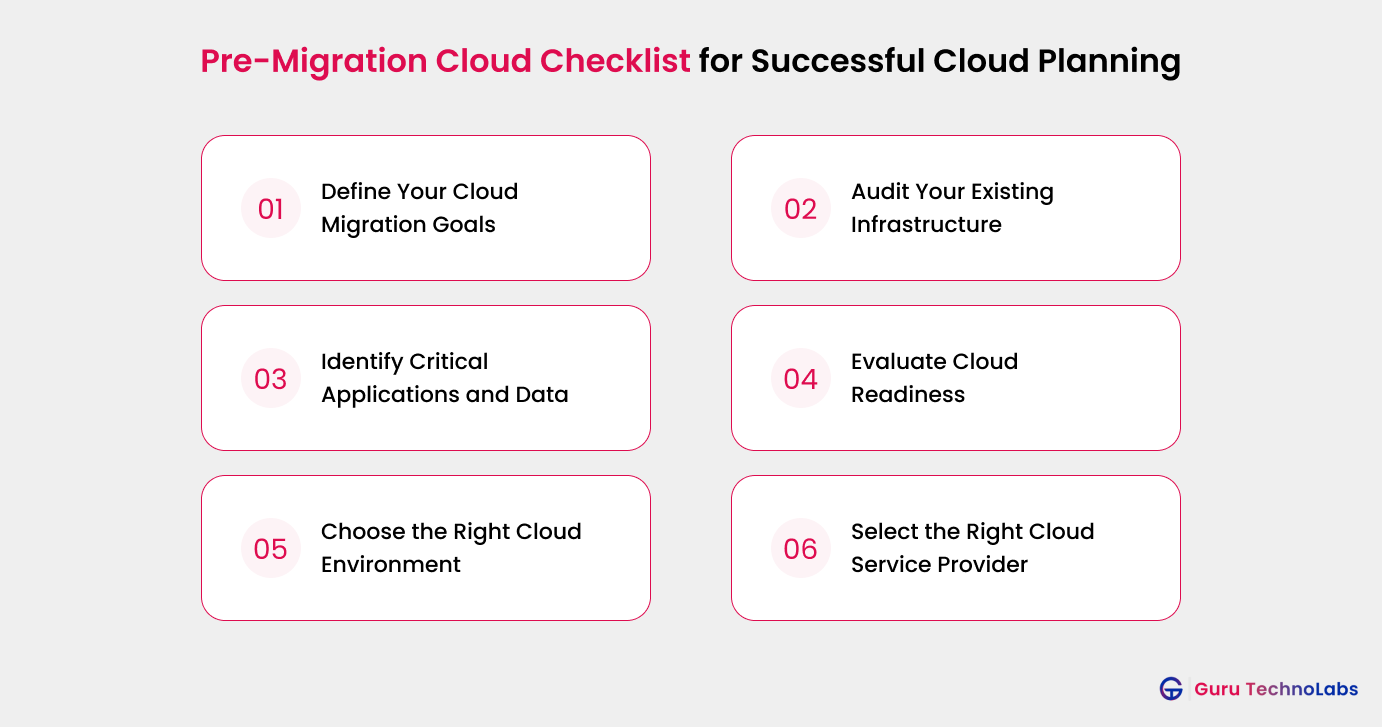
The pre-migration phase plays a major role in determining how smoothly a cloud migration project progresses. Many migration failures happen because businesses move workloads without fully understanding infrastructure dependencies, security requirements, operational risks, or long-term costs. Careful preparation before migration helps reduce disruptions, improve planning accuracy, and avoid expensive rework later in the project.
Define Your Cloud Migration Goals
Every migration should begin with clear business and technical objectives. Without defined goals, teams often move workloads to the cloud without evaluating whether the migration approach actually supports performance, scalability, or operational improvements.
Start by identifying the primary reasons behind the migration, such as improving scalability, reducing infrastructure costs, accelerating software releases, supporting AI workloads, or modernizing legacy systems. It is also important to define measurable outcomes, expected ROI, migration priorities, project scope, and realistic timelines before execution begins.
Expert Tip: Don’t treat cloud migration as an IT-only project. Involve business stakeholders early so your migration goals align with business priorities, budgets, and long-term growth plans, not just technical requirements.
Audit Your Existing Infrastructure
A complete infrastructure assessment helps teams understand what currently exists, how systems interact, and which workloads may create migration challenges. This step is especially important for organizations managing legacy applications, tightly coupled systems, or complex enterprise environments.
The audit process should include:
- Reviewing all existing applications and workloads
- Identifying outdated systems that may require refactoring or replacement
- Analyzing compute, storage, and network utilization
- Mapping software, database, and hardware dependencies
- Identifying workloads with high downtime sensitivity
Businesses that skip infrastructure analysis often discover hidden dependencies only after migration begins, leading to delays and operational issues.
Common Mistake: One of the most common mistakes is overlooking hidden dependencies between applications, databases, and third-party services. A missed dependency can lead to unexpected downtime or application failures during migration.
Identify Critical Applications and Data
Not all applications require the same migration strategy. Some workloads can be migrated quickly with minimal risk, while others may support critical business operations and require extensive testing, phased migration, or modernization.
During this stage, teams should:
- Categorize mission-critical applications
- Identify sensitive, regulated, or high-value data sets
- Prioritize workloads based on operational importance
- Define uptime and availability requirements for each system
- Evaluate which applications are suitable for lift and shift versus modernization
This process helps businesses reduce risk by ensuring critical systems receive additional planning and validation before migration.
Evaluate Cloud Readiness
A cloud readiness assessment helps determine whether current infrastructure, applications, operations, and internal teams are prepared for cloud adoption. Readiness involves more than technology alone. Skills, governance, security processes, and operational maturity also affect migration success.
Key areas to evaluate include:
- Infrastructure compatibility with cloud platforms
- Application architecture and modernization requirements
- Network bandwidth, latency, and connectivity limitations
- Security and compliance readiness
- Internal cloud expertise and training gaps
Many organizations discover during this stage that some applications require redesign or refactoring before they can operate efficiently in cloud environments.
Expert Tip: If your team is new to cloud technologies, consider investing in training or working with an experienced cloud partner before migration begins. Strong planning often saves far more time and cost than fixing issues after deployment.
Choose the Right Cloud Environment
Selecting the right cloud environment has long-term implications for performance, compliance, scalability, and operational costs. The best environment depends on workload requirements, industry regulations, and business priorities.
Public Cloud
Public cloud environments are commonly used for scalable applications, customer facing platforms, and workloads with fluctuating demand. They provide faster deployment, lower upfront infrastructure investment, and flexible resource scaling.
Private Cloud
Private cloud environments are often preferred by organizations with strict compliance, data sovereignty, or performance requirements. Industries such as healthcare, finance, and government frequently choose private cloud models for greater control and customization.
Hybrid Cloud
A hybrid cloud combines on-premises infrastructure with public or private cloud environments. This model allows businesses to maintain sensitive workloads internally while using cloud infrastructure for scalability and flexibility. It is commonly used by enterprises managing legacy systems or regulatory constraints.
When evaluating cloud environments, businesses should consider:
- Data sensitivity and compliance obligations
- Latency and performance requirements
- Long-term operational costs
- Integration complexity
- Vendor lock-in risks
- Disaster recovery and business continuity needs
Common Mistake: Choosing a cloud model based solely on cost can create challenges later. Always consider security, compliance, scalability, and long-term operational needs alongside pricing.
Select the Right Cloud Service Provider
Choosing the right cloud provider is a critical part of migration planning. AWS, Microsoft Azure, and Google Cloud each offer different strengths depending on infrastructure needs, existing technology stacks, scalability goals, and internal expertise. Frameworks such as Microsoft’s Cloud Adoption Framework and AWS’s migration guidance can also help businesses evaluate migration readiness, governance models, operational planning, and long-term cloud adoption strategies.
The evaluation process should include:
- Pricing transparency and cost management capabilities
- Security features and compliance certifications
- Regional infrastructure availability and data residency support
- SLA commitments and technical support quality
- Migration tooling and automation capabilities
- Partner ecosystems and enterprise support services
A well-planned pre-migration process creates a stronger foundation for every phase that follows. Businesses that invest time in assessment, readiness evaluation, and dependency mapping are far more likely to achieve stable, secure, and cost-effective cloud migrations.
Planning a Complex Cloud Migration?
Our cloud experts help businesses reduce migration risks, improve planning,
and build scalable cloud environments for long-term growth.
Cloud Security and Compliance Checklist
Security and compliance planning should begin long before workloads are moved to the cloud. Misconfigured access controls, weak identity management, and overlooked compliance requirements are some of the most common reasons cloud migration projects face operational and regulatory risks. A structured cloud migration security checklist helps businesses protect sensitive data, reduce vulnerabilities, and maintain compliance throughout the migration process.
Define Identity and Access Controls
Identity and access management is one of the most critical areas of cloud security. During migration, businesses often work across multiple teams, environments, and third-party tools, increasing the risk of unauthorized access if permissions are not managed carefully.
Key access control practices include:
- Creating granular user roles and permission levels
- Following the principle of least privilege
- Enabling multi-factor authentication for privileged accounts
- Monitoring user access activity and login behavior continuously
- Reviewing inactive accounts and unnecessary permissions regularly
Strong identity management reduces the likelihood of insider threats, credential misuse, and accidental exposure of sensitive workloads.
Plan Data Security Measures
Protecting business data during migration is essential, especially when transferring customer information, financial records, healthcare data, or proprietary business assets across environments.
Important data security measures include:
- Encrypting data during transfer and storage
- Setting up automated backup systems with geographic redundancy
- Defining secure data retention and deletion policies
- Monitoring data transfer activity for unusual behavior
- Classifying sensitive data before migration begins
Organizations that migrate unclassified or poorly managed data often face higher storage costs, governance issues, and compliance risks after migration.
Review Compliance Requirements
Every industry has different compliance obligations, and cloud migration plans should align with those requirements before deployment begins. Compliance planning becomes even more important for businesses operating across multiple regions or handling regulated customer data.
Common compliance frameworks include:
- GDPR for organizations handling European user data
- HIPAA for healthcare and patient information
- PCI DSS for payment card processing
- SOC 2 for SaaS and technology providers
- Regional regulations, such as RBI guidelines in India
Businesses should also review cloud provider certifications, audit capabilities, logging policies, and data residency support before selecting a deployment environment.
Prepare Disaster Recovery and Backup Plans
Even well-planned migrations can encounter outages, failed deployments, or unexpected infrastructure issues. Disaster recovery planning helps businesses reduce downtime and maintain operational continuity when problems occur.
A strong recovery strategy should include:
- Defining Recovery Time Objectives and Recovery Point Objectives for critical workloads
- Setting backup frequency based on application importance and data sensitivity
- Creating workload rollback procedures before migration execution
- Testing disaster recovery plans regularly instead of relying only on documentation
- Identifying failover processes for business-critical systems
Businesses that treat disaster recovery as part of migration planning rather than a post-migration task are generally better prepared to handle operational disruptions and security incidents.
Reduce Security Risks During Cloud Migration
We help businesses build secure and compliant cloud environments while reducing migration risks and operational disruptions.
Cloud Data Migration Checklist for Secure and Accurate Transfer
Data migration is one of the most sensitive parts of the cloud migration process. Incomplete records, inconsistent formats, duplicate files, and poor validation practices can create operational issues long after migration is complete. A structured data migration checklist helps businesses maintain data accuracy, reduce transfer risks, and improve usability in the new cloud environment.
Clean and Organize Existing Data
Before migration begins, businesses should review and prepare their existing data environments. Migrating outdated or low-quality data increases storage costs, complicates governance, and affects application performance after deployment.
The data cleanup process should include:
- Removing outdated, unused, or obsolete records
- Eliminating duplicate files and databases
- Standardizing formats and naming conventions
- Archiving inactive data that does not require immediate migration
- Identifying sensitive or regulated data before transfer
Well-organized data improves migration efficiency and reduces post-migration management issues.
Plan Data Migration Workflow
A clear migration workflow helps teams move data in a controlled and predictable manner. Poor sequencing or unplanned transfers often lead to downtime, synchronization issues, or failed workloads during migration.
Important planning steps include:
- Defining migration order based on workload priority and dependencies
- Choosing suitable migration tools and transfer methods
- Scheduling migration activities during low traffic periods
- Planning synchronization for live or actively changing data
- Creating rollback procedures for critical workloads
Businesses handling large databases or real-time transactional systems may also require phased migration strategies to minimize operational disruption.
Expert Tip: Avoid migrating unnecessary data. Cleaning up outdated files, duplicate records, and unused databases beforehand can reduce migration time, lower storage costs, and simplify ongoing cloud management.
Validate Data Before Migration
Data validation helps ensure transferred information remains accurate, complete, and functional after migration. Skipping validation increases the risk of corrupted records, application failures, and reporting inconsistencies in production environments.
Validation processes should include:
- Checking data accuracy and completeness
- Verifying integrity through checksums and audit processes
- Testing database compatibility with the target cloud environment
- Reviewing schema consistency and application dependencies
- Running sample validation tests before full-scale migration
Migrating poor-quality or unverified data to the cloud often creates larger operational and compliance problems later. Strong validation practices help businesses reduce those risks before workloads go live.
Cloud Application Migration Checklist
Application migration requires more than simply moving software to a cloud environment. Businesses must ensure applications remain stable, compatible, secure, and performant after migration. A structured cloud application migration checklist helps teams identify technical issues early, reduce downtime risks, and maintain a consistent user experience throughout the transition.
Test Application Compatibility
Before migration begins, businesses should evaluate whether applications can function properly within the target cloud environment. Legacy systems, outdated architectures, unsupported dependencies, and tightly coupled integrations often create compatibility challenges during migration.
The compatibility assessment should include:
- Verifying operating system compatibility with the target cloud platform
- Testing APIs and third-party integrations
- Confirming database connection and networking requirements
- Reviewing licensing terms for SaaS platforms and external tools
- Identifying applications that may require refactoring or modernization
Applications with complex dependencies or older architectures may need phased migration planning instead of direct lift and shift approaches.
Prepare Application Performance Testing
Cloud migration can affect application speed, stability, and resource consumption if workloads are not tested properly before deployment. Performance testing helps teams identify bottlenecks and validate whether applications can handle expected traffic and usage patterns in the cloud environment.
Important performance testing activities include:
- Running load tests to simulate real user traffic
- Conducting stress tests to identify system limitations
- Benchmarking application performance against current environments
- Monitoring latency, response times, and resource utilization
- Testing application scalability under peak demand conditions
Performance testing becomes especially important for customer-facing platforms, transactional systems, and real-time applications where downtime or slow response times can directly impact business operations.
Create an Application Backup Plan
Backup and recovery planning helps businesses reduce operational risk during migration. Even well-tested migrations can encounter deployment failures, configuration issues, or unexpected application behavior after workloads move to the cloud.
A strong application backup strategy should include:
- Backing up application configurations and environment variables
- Maintaining version control for migration artifacts and deployment scripts
- Creating rollback procedures for failed deployments
- Testing recovery processes before migration execution
- Documenting dependencies and restoration steps for critical applications
Businesses that validate recovery procedures in advance are generally better prepared to minimize disruption if migration issues occur during production deployment.
Cloud Migration Execution Checklist
The execution phase is where migration planning is tested in real environments. Even well-planned cloud migration projects can encounter performance issues, dependency conflicts, downtime risks, or unexpected operational disruptions during deployment. A structured cloud migration execution checklist helps businesses move workloads in a controlled manner while minimizing risk and maintaining service continuity.
Start With a Pilot Migration
Migrating all workloads at once significantly increases operational risk. Most successful cloud migration projects begin with smaller, lower-risk workloads to validate processes, identify technical issues, and improve migration workflows before scaling to business-critical systems.
A pilot migration should focus on:
- Moving low-risk and non-critical applications first
- Identifying compatibility or performance issues early
- Testing migration tools, automation workflows, and rollback procedures
- Monitoring downtime, user impact, and system stability closely
- Validating operational readiness before larger migrations begin
Pilot migrations help teams gain practical experience and reduce uncertainty before handling larger production environments.
Monitor Migration Progress
Continuous monitoring during migration helps businesses identify issues before they affect users or business operations. Real-time visibility becomes especially important when migrating interconnected workloads or applications with complex dependencies.
Migration monitoring should include:
- Tracking workload migration status in real time
- Validating transferred data immediately after migration
- Monitoring application performance and infrastructure health
- Reviewing system logs for errors or unusual activity
- Verifying user access permissions and integration functionality
Strong monitoring practices help teams respond faster to migration issues and reduce the likelihood of prolonged service disruptions.
Verify Migration Success
Once workloads are migrated, businesses should validate that systems function correctly, security configurations remain intact, and operational processes continue as expected. Skipping post-migration verification often allows hidden issues to reach production environments.
The validation process should include:
- Confirming that application features and workflows operate correctly
- Verifying security policies and access controls transferred successfully
- Reviewing data accuracy and synchronization across systems
- Testing integrations between migrated and existing workloads
- Ensuring business operations continue without interruption
Organizations that validate workloads carefully after migration are better positioned to maintain performance, security, and operational stability as cloud adoption expands.
Post Migration Cloud Checklist
Cloud migration does not end once workloads go live. Many businesses realize the real challenges begin after deployment, when they must manage performance optimization, cloud costs, security monitoring, governance, and operational stability in the new environment. A structured post-migration cloud checklist helps businesses improve long-term cloud efficiency while reducing operational and financial risks.
Monitor Cloud Performance
Continuous monitoring helps businesses understand how workloads perform after migration and whether resources are being utilized efficiently. Performance issues may not appear immediately during deployment, especially in hybrid or multi-cloud environments with complex dependencies.
Post migration performance monitoring should include:
- Tracking resource utilization across compute, storage, and networking
- Monitoring application response times and service reliability
- Identifying latency or connectivity issues in hybrid environments
- Reviewing workload scaling behavior during peak demand periods
- Monitoring infrastructure health and uptime continuously
Ongoing monitoring helps teams identify bottlenecks early and improve overall cloud stability over time.
Optimize Cloud Costs
Many organizations overspend after migration because cloud resources are not monitored or optimized regularly. Unused instances, oversized workloads, and poor storage management often increase operational costs without improving performance.
Cloud cost optimization activities should include:
- Removing unused or idle cloud resources
- Right-sizing compute and storage based on actual usage patterns
- Setting up budget alerts and monthly cost reviews
- Monitoring resource consumption across teams and departments
- Applying FinOps practices to improve financial accountability
Businesses that actively optimize cloud spending are generally better positioned to improve ROI and avoid long-term infrastructure waste.
Strengthen Cloud Security
Security management should continue after migration rather than being treated as a one-time setup activity. Cloud environments evolve constantly, and new workloads, users, integrations, and configurations can introduce additional risks over time.
Post-migration security practices should include:
- Enabling continuous security monitoring and threat detection
- Applying security updates and patches automatically where possible
- Reviewing identity and access policies regularly
- Running compliance audits against internal and regulatory standards
- Monitoring logs and unusual system behavior proactively
Continuous security management helps businesses reduce exposure to misconfigurations, unauthorized access, and evolving cyber threats.
Expert Tip: Cloud security doesn’t stop once the migration is complete. As your cloud environment evolves, regularly review user access, security settings, and monitoring tools to make sure they continue to support your business and protect against new security risks.
Train Teams and Update Documentation
Successful cloud adoption depends not only on technology but also on operational readiness. Teams responsible for managing cloud environments should understand new workflows, security processes, monitoring tools, and incident response procedures after migration.
Post migration operational improvements should include:
- Providing formal cloud training for internal teams
- Updating runbooks and operational procedures
- Maintaining accurate documentation for cloud infrastructure and dependencies
- Reviewing incident response and escalation processes
- Documenting configuration changes and architecture updates continuously
Organizations that invest in cloud training and operational documentation are typically better prepared to scale cloud environments efficiently while maintaining long-term governance and stability.
Need Help Optimizing Your Cloud Environment?
Improve cloud performance, control infrastructure costs, and strengthen security with expert cloud optimization and management support.
Common Cloud Migration Mistakes to Avoid

Even well-planned cloud migration projects can face delays, security issues, or cost overruns when important planning and operational steps are overlooked. Understanding the most common cloud migration mistakes helps businesses reduce avoidable risks and improve migration outcomes.
Skipping Infrastructure Assessment
Businesses cannot migrate environments effectively without understanding existing infrastructure, dependencies, and workload behavior. Incomplete infrastructure assessments often lead to unexpected compatibility issues, downtime, and migration delays later in the project.
Ignoring Security Planning
Security misconfigurations remain one of the leading causes of cloud-related incidents. Delaying identity management, access controls, encryption planning, or compliance reviews until after migration increases operational and regulatory risk significantly.
Not Creating Backup and Rollback Plans
Migration projects should always include tested backup and rollback procedures. Without recovery planning, businesses may struggle to restore workloads quickly if deployments fail or data becomes corrupted during migration.
Migrating All Workloads at Once
Attempting large-scale migrations without phased execution increases operational complexity and reduces visibility into potential issues. Gradual migration approaches allow teams to identify and resolve problems before moving business-critical systems.
Performing Limited Testing Before Migration
Insufficient testing often causes application failures, integration issues, and performance bottlenecks after deployment. Compatibility testing, load testing, and validation processes help teams detect issues before workloads reach production environments.
Neglecting Post-Migration Monitoring
Many businesses focus heavily on migration execution but fail to monitor environments properly after deployment. Without continuous monitoring, cloud costs, security gaps, and performance issues can grow unnoticed over time.
Businesses that proactively address these common mistakes are generally better prepared to achieve secure, stable, and cost-effective cloud migration outcomes.
Best Practices for Successful Cloud Migration Planning
Successful cloud migration projects require more than technical execution alone. Long term success depends on planning accuracy, operational visibility, security readiness, and continuous optimization throughout the migration lifecycle.
Start With Smaller Workloads
Beginning with low-risk workloads allows teams to validate migration processes, improve workflows, and gain operational experience before handling larger or business critical systems.
Use Automation Wherever Possible
Automation tools help reduce manual errors, improve deployment consistency, accelerate migration timelines, and simplify infrastructure management across large environments.
Monitor Continuously Throughout Migration
Cloud migration should be treated as an ongoing operational process rather than a one time project. Continuous monitoring helps teams identify performance issues, security risks, and resource inefficiencies early.
Maintain Detailed Documentation
Accurate documentation helps businesses track infrastructure dependencies, configuration changes, migration decisions, and operational procedures throughout the migration process. This becomes especially important in large enterprise environments with multiple teams and systems.
Work With Experienced Cloud Migration Experts
Complex migrations often involve legacy infrastructure, compliance requirements, application dependencies, and operational challenges that require specialized expertise. Working with experienced cloud migration professionals can help businesses reduce migration risks, improve planning accuracy, and accelerate successful cloud adoption through proven frameworks and best practices.
Quick Cloud Migration Checklist Summary
Quick Cloud Migration Checklist Summary
| Migration Stage | Key Activities |
| Pre-Migration Planning | Infrastructure assessment, migration planning, cloud readiness evaluation |
| Security and Compliance Planning | Access control setup, compliance validation, backup, and disaster recovery planning |
| Data Migration | Data cleanup, validation, migration workflow planning, and integrity checks |
| Application Migration | Compatibility testing, performance testing, and application backup planning |
| Migration Execution | Pilot migration, workload monitoring, and migration validation |
| Post Migration Optimization | Performance monitoring, cloud cost optimization, and security management |
This quick cloud migration checklist summary provides a simplified view of the entire migration process and can be used as a practical reference during planning, execution, and post-migration optimization activities.
Final Thoughts
Cloud migration is no longer just about moving infrastructure to the cloud. Businesses also need to focus on security, performance, scalability, cost management, and long-term operational stability throughout the migration process.
A structured cloud migration checklist helps teams reduce risk, improve planning, avoid costly mistakes, and maintain business continuity during every stage of migration. Whether the goal is to modernize legacy systems, improve scalability, or support future growth, careful planning and phased execution play a critical role in successful cloud adoption.
With the right migration strategy, governance, and ongoing optimization, businesses can build a more flexible, secure, and scalable cloud environment that supports long-term business goals.
FAQs
A cloud migration checklist is a structured framework that helps businesses plan, manage, and execute cloud migration projects successfully. It includes important steps such as infrastructure assessment, security planning, data migration, application testing, migration execution, and post-migration optimization.
A cloud migration checklist helps businesses reduce migration risks, avoid downtime, improve security, control cloud costs, and maintain business continuity throughout the migration process. It also helps teams stay organized and avoid missing critical migration tasks.
The main phases of cloud migration typically include:
- Pre-migration assessment and planning
- Security and compliance preparation
- Data and application migration
- Migration execution and testing
- Post migration monitoring and optimization
Each phase plays an important role in ensuring a smooth and secure migration.
Businesses prepare for cloud migration by auditing existing infrastructure, identifying application dependencies, evaluating cloud readiness, selecting the right cloud environment, defining migration goals, and creating backup and rollback plans before workloads are moved.
Before migrating to the cloud, businesses should review:
- Infrastructure dependencies
- Data sensitivity and compliance requirements
- Application compatibility
- Network performance and bandwidth
- Cloud costs and licensing
- Security and access controls
- Backup and disaster recovery plans
Careful assessment helps reduce operational and security risks during migration.
Businesses can reduce cloud migration risks by starting with pilot workloads, testing applications before deployment, validating migrated data, implementing strong security controls, monitoring workloads continuously, and using phased migration strategies instead of moving everything at once.
Some of the most common cloud migration challenges include:
- Unexpected cloud costs
- Legacy application compatibility issues
- Security misconfigurations
- Downtime during migration
- Data transfer complexity
- Lack of cloud expertise
- Integration and dependency issues
Proper planning and monitoring help businesses address these challenges more effectively.
Cloud migration timelines depend on infrastructure complexity, workload size, compliance requirements, and modernization needs. Small migrations may take a few weeks, while large enterprise cloud migration projects can take several months or longer to complete.
The biggest risks during cloud migration include data loss, security misconfigurations, unexpected downtime, and poor dependency management. Businesses can reduce these risks through proper planning, testing, backup strategies, and continuous monitoring.
Cloud migration focuses on moving applications, data, and infrastructure to cloud environments, while cloud modernization involves improving or redesigning applications to take full advantage of cloud native technologies, scalability, automation, and performance optimization.
A cloud readiness assessment is a process used to evaluate whether an organization’s infrastructure, applications, security policies, and operational processes are prepared for cloud migration. It helps identify technical gaps, migration risks, and modernization requirements before migration begins.
Some workloads can be migrated with minimal or near-zero downtime using phased migration strategies, replication methods, and failover planning. However, the level of downtime depends on application architecture, infrastructure complexity, and migration approach.