How to Optimize Cloud Costs Without Compromising System Scalability
Table of Contents
- Why Cloud Cost Optimization and Scalability Often Conflict
- Common Mistakes Businesses Make in Cloud Cost Optimization
- Strategic Cloud Cost Optimization: A Layered Architecture Approach
- Scalability Considerations While Optimizing Cloud Costs
- Automation in Cloud Cost Optimization: Best Practices for Scale
- Real-World Scenario: Optimizing Cloud Costs Without Performance Impact
- When Businesses Should Consider Expert Cloud Cost Optimization Services
- Conclusion
- Frequently Asked Questions
Cloud costs don’t usually spike overnight; they creep up as the business grows. A SaaS platform adds new features, traffic increases, and teams provision extra capacity to stay ahead of demand. Over time, what once felt like safe provisioning decisions start showing up as a steadily rising cloud bill that no one specifically approved.
The pressure to scale doesn’t slow down while the bill climbs. Systems need to handle traffic spikes, new product launches, and growing user expectations without failure. For CIOs and engineering leaders, this creates a difficult balance: reduce cloud spending without putting performance or availability at risk.
What makes this harder is that most organizations treat cost optimization as a reactive exercise. Someone flags the bill, resources get cut, and two weeks later, the team is troubleshooting latency issues they didn’t have before. Cost optimization done wrong doesn’t just waste effort; it introduces system risk.
Cloud cost optimization, when approached as an architectural discipline rather than a budget exercise, looks very different. It starts with understanding how workloads actually behave, where inefficiencies are hiding, and how to build systems that scale efficiently without scaling costs at the same rate.
What follows in this guide is a structured breakdown of practical cloud cost optimization strategies designed to help growth-stage businesses reduce spend while keeping systems scalable, stable, and ready for what comes next.
Why Cloud Cost Optimization and Scalability Often Conflict
Cloud costs grow for predictable reasons. Infrastructure gets overprovisioned during initial setup because teams estimate on the high side, and nobody wants to be responsible for downtime. Over time, resources accumulate: test environments stay alive, storage volumes grow without lifecycle policies, and reserved capacity sits unused after workload patterns shift.
Meanwhile, scalability demands the opposite instinct. You need buffer capacity. You need redundancy. You need the ability to absorb a 3x traffic spike without an emergency war room. According to AWS’s Well-Architected Framework, designing for elasticity is a foundational pillar, but elasticity without governance is just overspending with extra steps.
The core tension is straightforward: reducing cost often means reducing capacity, and reducing capacity introduces risk. Understanding why cloud cost optimization is important starts here because the businesses that navigate this well don’t treat it as a trade-off. They treat it as a design problem.
Common Mistakes Businesses Make in Cloud Cost Optimization
Before getting into what works, it’s worth understanding what doesn’t because these mistakes are alarmingly common across organizations at every stage.
Cutting resources without workload analysis: Someone identifies a cluster running at 40% average utilization and downsizes it, not accounting for the fact that it hits 95% every Tuesday during batch processing. Average utilization is misleading in isolation.
Treating auto-scaling as set-and-forget: What we’ve seen in practice is that teams configure scaling rules once during deployment and never revisit them, even after traffic patterns shift seasonally.
Ignoring zombie resources: Orphaned load balancers, unattached storage volumes, and idle database replicas; these don’t show up in performance dashboards, so they stay invisible until someone audits the bill line by line.
One-time optimization projects: Cloud environments change weekly. A snapshot optimization that saves 20% in January may be irrelevant by March if new services have been deployed.
Choosing the cheapest option without understanding workload characteristics: Deploying stateful workloads on spot capacity without a proper interruption-handling strategy leads to data loss and downtime.
Each of these mistakes shares a root cause: optimizing cost in isolation from system architecture.
Strategic Cloud Cost Optimization: A Layered Architecture Approach
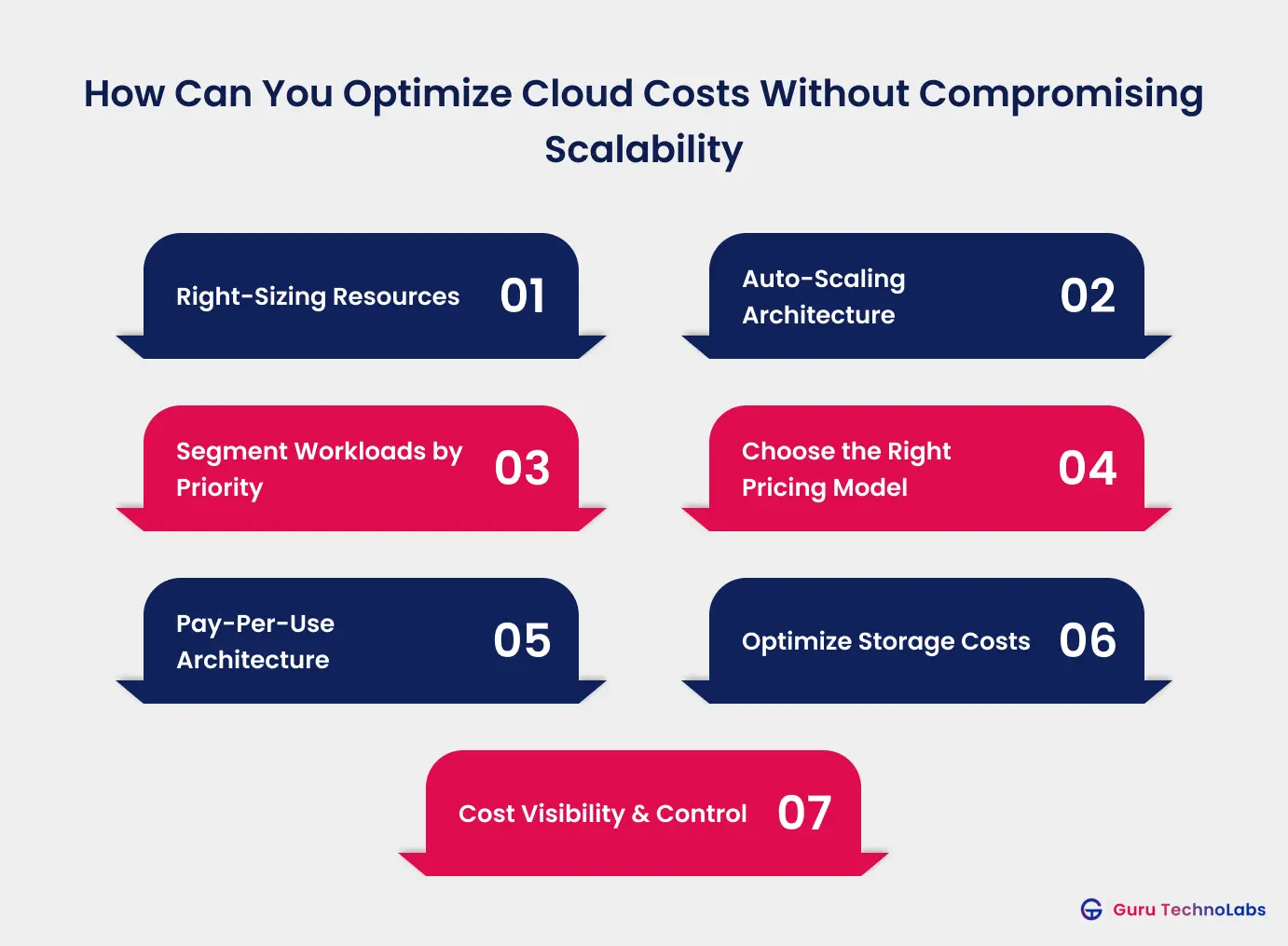
Effective cloud cost optimization strategies don’t start with the billing dashboard. They start with understanding how your system is built, how workloads behave, and where the actual leverage points exist.
What follows is a layered approach, each layer builds on the previous one, and skipping layers creates gaps that surface as incidents later.
Right-Sizing: A Core Cloud Cost Optimization Technique
Right-sizing is the foundation of cloud cost optimization. It involves aligning your compute, memory, and storage resources with actual workload usage, not outdated estimates made during earlier planning stages.
This requires at least 2–4 weeks of usage data across different periods, including weekdays, weekends, month-end peaks, and seasonal variations. Cloud cost optimization tools like Azure Advisor and AWS Compute Optimizer provide recommendations based on historical utilization, but these still require human judgment. For example, a machine learning job that runs once a week has very different requirements compared to an always-on API gateway.
In most cases, right-sizing alone can deliver 15–25% cost savings, making it one of the lowest-risk and highest-impact optimization steps when backed by accurate data.
Auto-Scaling Architecture for Dynamic Workloads
Auto-scaling moves you from static provisioning to demand-responsive infrastructure. But effective scaling requires more than enabling the feature.
You need distinct scaling policies for different workload types. A customer-facing web application should scale on request latency thresholds, not just CPU, because by the time CPU spikes, users are already experiencing delays.
Predictive scaling adds another layer. If your traffic patterns are predictable, say, a travel booking platform that sees consistent spikes during holiday planning seasons, you can pre-scale ahead of demand rather than reacting to it.
Instead of provisioning for peak capacity 24/7, you provision for baseline and let scaling handle the rest.
Workload Segmentation Strategy
Not every workload deserves the same infrastructure treatment. Segmenting workloads by criticality and cost sensitivity is where organizations unlock the most strategic savings.
| Workload Type | Priority | Cost Strategy | Example |
|---|---|---|---|
| Revenue-critical | High | Reliability-first, optimize where safe | Payment processing, API gateway |
| Customer-facing | Medium-High | Balance performance and cost | Web frontend, search service |
| Internal tools | Medium | Aggressive right-sizing | Admin dashboards, reporting |
| Development/Test | Low | Scheduled shutdown, spot instances | Staging environments, CI/CD runners |
| Batch/Analytics | Flexible | Spot instances, off-peak scheduling | Data pipelines, ML training |
What we’ve found is that applying a uniform cost strategy across all workloads either leaves money on the table or introduces unacceptable risk. This is particularly true for cloud cost optimization strategies for large enterprises, where dozens of teams run hundreds of services with different criticality profiles.
Choosing the Right Pricing Models for Cloud Cost Optimization
Cloud providers offer several pricing tiers, and matching the right model to each workload type is one of the most impactful cloud cost optimization techniques available.
Reserved capacity (1-year or 3-year commitments) makes sense for steady-state workloads with predictable utilization, typically delivering 30-60% savings compared to on-demand. But over-committing locks you into capacity you might not need if business requirements shift.
Spot and preemptible instances offer 60-90% discounts for workloads that can tolerate interruption. Batch processing, data analytics, CI/CD pipelines, and stateless microservices are strong candidates.
Savings plans offer a middle ground: commitment-based discounts without being locked to specific instance types, working well for evolving workload mixes.
A blended approach reserved for baseline, on-demand for buffer, and spot for flexible workloads, is what most mature cloud cost optimization solutions look like in practice.
| Workload Type | Priority | Cost Strategy | Example |
|---|---|---|---|
| Revenue-critical | High | Reliability-first, optimize where safe | Payment processing, API gateway |
| Customer-facing | Medium-High | Balance performance and cost | Web frontend, search service |
| Internal tools | Medium | Aggressive right-sizing | Admin dashboards, reporting |
| Development/Test | Low | Scheduled shutdown, spot instances | Staging environments, CI/CD runners |
| Batch/Analytics | Flexible | Spot instances, off-peak scheduling | Data pipelines, ML training |
What we’ve found is that applying a uniform cost strategy across all workloads either leaves money on the table or introduces unacceptable risk. This is particularly true for cloud cost optimization strategies for large enterprises, where dozens of teams run hundreds of services with different criticality profiles.
Serverless and Event-Driven Architectures
Serverless computing flips the cost model entirely: you pay per execution rather than per hour of provisioned capacity. For workloads with unpredictable or spiky traffic patterns, this eliminates the idle-capacity problem.
Event-driven architectures extend this further. Instead of polling services running continuously, components activate only when triggered — a file upload, a database change, an API call. Google Cloud’s event-driven architecture documentation outlines how this pattern reduces both cost and operational complexity.
The fit isn’t universal. Serverless introduces cold-start latency that may be unacceptable for real-time applications, and costs can exceed provisioned infrastructure at consistently high throughput. The decision should be workload-specific.
Storage Optimization Layer
Storage costs are the silent budget killer. They grow monotonically, data accumulates but rarely gets deleted, and most organizations don’t have lifecycle policies in place.
Match storage tier to access frequency. Data accessed daily belongs on high-performance storage. Data accessed monthly belongs on standard tiers. Data retained for compliance but rarely accessed belongs on archive tiers, where costs drop by 80-90%.
Implementing tiered storage requires a data classification exercise, understanding what data exists, who accesses it, and how frequently. For organizations managing complex digital transformation initiatives, storage optimization is often one of the first tangible wins — high impact, relatively low risk.
Cost Monitoring and Governance Layer
None of the previous layers sustain themselves without continuous monitoring and accountability. This is where cloud cost optimization best practices intersect with organizational discipline.
Effective governance includes real-time cost dashboards broken down by team, project, and environment, not just a single monthly total. It includes budget alerts that trigger before thresholds are breached, not after. And critically, it includes cost accountability: every cloud resource should be tagged with an owner and a purpose.
Scalability Considerations While Optimizing Cloud Costs
Cost optimization that compromises your ability to scale is a short-term gain with long-term consequences. Here’s how to protect scalability while reducing spend.
Preserve headroom for traffic spikes: Right-sizing should target a utilization ceiling of 60-70% for production workloads, not 90%. That remaining capacity is your buffer for unexpected demand.
Design for horizontal, not just vertical scaling: Vertical scaling (bigger instances) hits a ceiling and gets expensive fast. Horizontal scaling (more instances) is more cost-effective at scale and pairs naturally with auto-scaling. This often requires architectural changes, stateless services, externalized session management, and distributed caching.
Database scaling deserves special attention: Read replicas, connection pooling, and query optimization often deliver more performance per dollar than upgrading to a larger instance. For organizations planning to migrate legacy system architectures to the cloud, understanding the trade-offs between rehosting, replatforming, and refactoring determines both the cost profile and the scalability ceiling.
Monitor performance alongside cost: Response latency, error rates, and throughput should be tracked on the same dashboard as spending. If a cost optimization change correlates with degraded performance, you need to see that relationship immediately, not after users start complaining.
Automation in Cloud Cost Optimization: Best Practices for Scale
Manual cloud cost management doesn’t scale. An engineer reviewing dashboards weekly might work for a single application, but organizations running dozens of services across multiple environments need automation.
Automated scaling policies adjust capacity in real-time based on demand signals — removing human reaction time from the scaling response loop.
Scheduled resource management handles predictable waste. Development and staging environments running 24/7 but used only during business hours can be automatically shut down on evenings and weekends – saving 65% or more on those resources.
Cost anomaly detection uses baseline spending patterns to flag unusual activity. Automated cost optimization vs manual cloud cost management comes down to reaction speed: automated systems detect anomalies within minutes, while manual reviews catch them days later.
Auto-remediation workflows go further by acting, not just alerting. An unattached storage volume detected by an automated scan can be flagged for review or removed after a grace period.
Real-World Scenario: Optimizing Cloud Costs Without Performance Impact
Consider a mid-size SaaS company running a multi-tier application across 120+ cloud instances. Monthly cloud spend had grown to $85,000 – a 40% increase over the previous year without a corresponding increase in traffic.
A cloud cost optimization assessment revealed: 35% of instances were oversized relative to actual utilization, test environments were running 24/7, storage volumes from decommissioned services were still active, and all workloads ran on on-demand pricing.
The approach was methodical. Right-sizing was applied to non-critical workloads based on 30 days of utilization data. Scheduled shutdowns were implemented for development environments. 4TB of data was migrated to archive storage. Steady-state production workloads were moved to reserved instances.
Monthly spend dropped to $52,000, a 39% reduction. Response latency remained within SLA. System availability stayed above 99.95%. The cloud cost optimization benefits were sustained long-term because monitoring and governance processes were established to maintain the gains.
Reduce Cloud Costs Without Risking Performance
If your cloud spend is increasing and you’re not sure where to cut, our experts can help. Get clear insights into where you’re overspending and how to optimize safely.
When Businesses Should Consider Expert Cloud Cost Optimization Services
Some organizations handle cloud cost optimization internally with strong DevOps teams. But there are inflection points where cloud cost optimization services from an external partner become valuable.
Rapidly escalating costs without a clear cause: If your bill is growing faster than your infrastructure footprint, the waste is likely distributed across many small inefficiencies that require systematic discovery.
Multi-cloud environments: Multi-cloud environments increase the complexity of cost optimization. Each cloud provider has different pricing models, discount structures, and monitoring tools. Managing costs effectively requires cross-platform visibility, something most internal tools do not provide by default.
Scaling or migration phases: Organizations in the middle of cloud migration or significant scaling often run parallel infrastructure temporarily, and the cost implications of architectural decisions made during these phases compound over the years. The challenges in migrating to cloud from legacy environments, such as workload compatibility, data transfer costs, and downtime risks, make it critical to get these decisions right early. The difference between a well-architected migration and a hasty one is evident in long-term cloud spend.
Limited in-house cloud expertise: Not every company needs a full-time cloud architect. Cloud consultants bring experience from working with many similar environments, helping identify cost inefficiencies that internal teams may overlook. Partnering with an experienced cloud cost optimization company like Guru TechnoLabs gives you access to expert, architecture-first guidance without the cost of hiring a full-time specialist.
How Much Are You Overpaying for Your Cloud Right Now?
Your cloud costs may be higher than they should be. Talk to our experts to find where you’re overspending and how to fix it without affecting your system performance.
Conclusion
Cloud cost optimization isn’t about spending less; it’s about spending accurately. Every dollar of cloud spend should map to a workload that delivers business value, provisioned at the right size, on the right pricing model, with the right scaling behavior.
The companies that sustain both cost efficiency and system scalability treat this as a continuous architectural discipline: layered, measured, and governed. They right-size based on data, segment workloads by criticality, automate what humans forget, and monitor cost and performance as a single concern.
This is where Guru TechnoLabs helps businesses by aligning cloud architecture decisions with long-term scalability and cost efficiency, rather than short-term cost-cutting.
That combination of strategic architecture plus operational discipline is what separates organizations that simply cut costs from those that build systems designed for efficient scale.
Optimize Cloud Costs Without Compromising Performance
Cut unnecessary cloud spend while ensuring your systems scale reliably with demand. Get expert, architecture-first guidance tailored to your infrastructure.
Frequently Asked Questions
Cloud cost optimization is the process of reducing cloud infrastructure expenses while maintaining performance and scalability. It involves analyzing usage patterns, right-sizing resources, selecting appropriate pricing models, and eliminating unused services to ensure every resource delivers measurable business value.
The best practices include right-sizing resources based on real usage, implementing workload-specific auto-scaling, using reserved and spot instances, applying storage lifecycle policies, and enabling continuous cost monitoring. These practices work best when combined into a structured, architecture-driven optimization strategy.
Cloud cost optimization is important because unmanaged cloud spending can grow 20–35% annually. It also helps identify architectural inefficiencies such as overprovisioning and poor scaling. Optimizing costs improves financial control while ensuring systems remain reliable, scalable, and performance-efficient.
Right-sizing is the process of aligning cloud resources like CPU, memory, and storage with actual workload requirements. It uses historical usage data to eliminate overprovisioning while maintaining enough capacity to handle peak demand without performance issues.
Start by gaining visibility through resource tagging and cost dashboards. Then prioritize high-impact actions like right-sizing and pricing model optimization. Automate scaling and monitoring, and establish governance policies so teams remain accountable for their cloud usage and spending.
The challenges in migrating to the cloud include application compatibility issues, data transfer complexity, downtime risks, and cost overruns during transition phases. Businesses that migrate legacy system architectures must carefully plan rehosting or refactoring strategies to avoid long-term performance and cost inefficiencies.
Multi-cloud environments increase cost complexity due to different pricing models, billing structures, and data transfer charges. Effective optimization requires centralized visibility, cross-platform cost monitoring, and a unified governance strategy to manage workloads efficiently across providers.
Automated cloud cost optimization is more efficient for scaling environments because it enables real-time adjustments, anomaly detection, and scheduled resource management. However, human oversight is still essential for strategic decisions like workload segmentation and architecture planning.