12 Best Web Development IDE in 2026
The Web development of 2026 is more complex, dynamic, and challenging than ever. The developers are supposed to build responsive websites, work with complex frameworks, process APIs, and achieve great performance simultaneously. This is why the presence of the appropriate web development IDE (Integrated Development Environment) is no longer a mere luxury but a necessity.
The best free IDE for web development can make your code run faster, reduce errors, and make your workflow much more comfortable. We are going to discuss the 12 of the best IDEs for web development to develop web applications. These AI-powered IDEs not only assist in writing the code but also enhance how one works and creates modern web applications.
What Is a Web Development IDE And Why Does It Matter?
A web development IDE (Integrated Development Environment) is a software application that brings together everything a developer needs to write, test, and debug code in a central place.
An IDE also has a smart code editor with syntax coloring, a built-in debugger, a build automation system, support for version control, and built-in extensions for your language and framework of interest, unlike a plain text editor.
The difference between fast, efficient website and application development can be tremendous when provided by a good IDE.
Not only a place to write code, but it also assists you in writing smarter code, debugging at an earlier stage, and it also keeps you organized as you work on more complex assignments.
This is the reason why IDEs are significant to web developers:
- Faster coding
- Fewer errors
- Improved project management
- Integrated tools,
- Improved productivity
- Better debugging
Using the best JavaScript IDEs, developers have the opportunity to focus on creating excellent web experiences rather than wrestling with tools.
IDE vs. Text Editor: The Key Difference
Beginners often get confused between an IDE and a text editor, since both are used to write code. They, however, have greatly varied degrees of features and development support.
| IDE (Integrated Development Environment) | Text Editor |
|---|---|
| Complete environment for software development | Simple tool for writing and editing code |
| Built-in compiler, debugger, and project tools | Usually, only basic editing features |
| More complex and feature-rich | Lightweight and simple |
| Often requires more setup and configuration | Minimal setup required |
| Visual Studio Code, IntelliJ IDEA, Eclipse IDE | Notepad++, Sublime Text, Notepad |
How to Choose the Right IDE for Web Development
Before going directly to the list, ask yourself four questions:
Language and structure support: Does the IDE know your stack?
No matter which tool you use, React, Vue, Laravel, Django, or Spring Boot, your IDE must have native or well-supported intelligence of that tool. You may still be considering the framework best suited to your project; in that case, our web application frameworks guide will help.
- Performance: Startup time and indexing performance are important on large codebases. Lightweight editors such as VS Code are generally faster on standard machines than heavyweight JVM-based IDEs.
- Extension ecosystem: Rich extension marketplace: It is not an IDE that tries to mold your workflow; it is loosely structured around it.
- Team and collaboration features: Team actions, Git integration, and live collaboration are equally significant as individual speed in a team.
- Budget: Most of the best IDEs are free. Commercial solutions such as WebStorm and PhpStorm provide language-specific tooling that professional groups can afford.
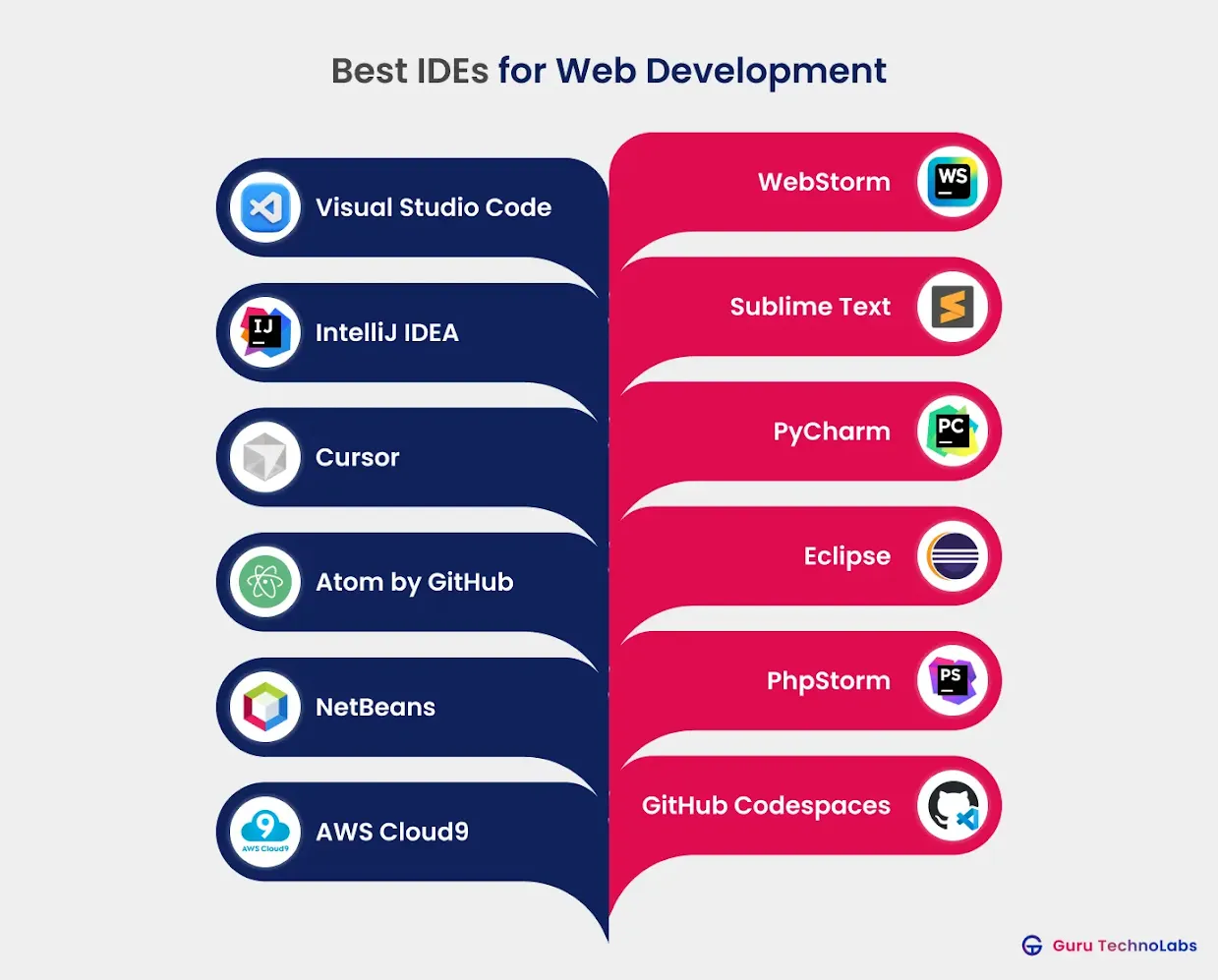
12 Best IDEs for Web Development in 2026
In this section of the blog, we discuss the top web development IDEs that make your work easier and can dramatically improve development speed and efficiency.
1. Visual Studio Code
Best For: General web development, JavaScript, TypeScript, React, Vue, Node.js
Visual Studio Code, the code editor, has been the most-used code editor in the world for 5 years since its launch by Microsoft. It is open source, free, and available for Windows, macOS, and Linux.
The editor is not the only thing that makes VS Code so unique. Nevertheless, its ecosystem – which now has more than 50,000 extensions – can be moulded into a highly specialized environment for virtually any language or framework.
In-built IntelliSense provides intelligent code completion, parameter hints, and inline documentation. GitHub Copilot is an in-house product, and research by GitHub found that 73 percent of programmers who use AI-assisted products report being in flow more frequently, and 87 percent report it spares them mental effort on repetitive tasks.
VS Code is an all-encompassing development environment thanks to its built-in terminal, Git support, and Live Share feature for pair programming.
Key Features: IntelliSense autocomplete, GitHub Copilot integration, 50,000+ extensions, multi-root workspaces, integrated Git, remote development via SSH/containers, built-in debugger.
Pricing: Free and open-source
2. WebStorm
Best for: JavaScript-intensive applications, React, Angular, Vue, and Node.js.
WebStorm is the most intelligent JavaScript IDE from JetBrains. In contrast to VS Code, which requires extensions, WebStorm has built-in language intelligence that requires no configuration.
It has an in-depth understanding of your codebase, and this translates into more refactoring, more error-free code, and more intelligent navigation in large projects.
When you are regularly developing complex web applications, the real-time nature of WebStorm’s code quality analysis, potential bugs, dead code, and performance potentials before you have ever actually run anything can save you a considerable amount of time in debugging.
It can easily be integrated with ESLint, Stylelint, Prettier, and Jest.
Key features: Intensive code analysis, smart refactoring, embedded debugger and test runner, framework support (React, Angular, Vue), Git, HTTP client, database, and tools.
Pricing: $79/year (individual), free for students, and open-source projects.
3. IntelliJ IDEA
Best for: Java full-stack, SpringBoot, Kotlin, multi-language enterprise applications.
IntelliJ IDEA, offered by JetBrains, is the default development tool for Java, and its Ultimate edition extends that comprehensive feature set to JavaScript, TypeScript, HTML, CSS, React, and Angular.
The JetBrains Developer Ecosystem Survey 2024 suggests that four out of five companies are already using third-party AI tools in their workflows, and the AI Assistant is built into IntelliJ, so it can be easily implemented there.
Its context-aware code compilation and data-flow analysis do indeed help ease the cognitive burden. IntelliJ is a reliable option in large organizations due to its ability to identify duplicate code, propose improvements, and perform intricate refactoring across a large codebase.
Key Features: Deep code intelligence, support for multiple languages, duplicate code detection, a database editor, an in-built terminal, Docker integration, and Spring Boot tools.
Pricing: Community Edition is free. Ultimate Edition starts at 249/year.
4. Sublime Text
Best for: Developers who are speed-conscious and multi-language developers who handle big files.
Sublime Text is among the fastest and most responsive code editors. It opens immediately, can open large files without slowing down, and allows multiple cursors to open so you can edit at the same time, which can dramatically reduce repetitive code changes.
It provides all popular web development languages and has a robust plug-in system with Package Control. Although it is less code-intensive than WebStorm or IntelliJ, it offers fast performance and a straightforward design that make it a favorite among developers who want a distraction-free, high-performance interface.
The Go To Anything button lets you navigate to a file, symbol, or line in a project immediately.
Key features: Blazing performance, multiple cursors, Goto Anything navigation, command palette, distraction-free mode, and cross-platform.
Pricing: One-time perpetual license costs $99, free to test indefinitely.
5. Cursor
Best for: AI-assisted development, rapid prototyping, contemporary 2026 workflows.
The biggest newcomer in the IDE market in recent years is Cursor. As a fork of VS Code, it retains the well-known interface and all extension support, with extensive AI integration built in rather than as a plug-in.
It can read the entire codebase, respond to queries about it, make multi-file changes, and interpret complex logic in plain English. According to the Stack Overflow Developer Survey 2025, Cursor is already used by 18% of the surveyed developers, a very impressive adoption rate of a tool that hardly existed two years prior.
To provide context, an arXiv-controlled study discovered that developers who used AI coding assistants took 55.8% less time to complete a task than those who did not.
Cursor is worth serious consideration if speed and AI-native workflows are important to you.
Key features: AI chat based on codebase, multi-file AI edits, compatibility with VS Code extensions, built-in terminal AI support, diff view of AI suggestions, and multi-model AI support.
Pricing: Free tier available. Pro plan at $20/month.
6. PyCharm
Best for: Python-based web development (Django, Flask, FastAPI), data-driven applications.
PyCharm by JetBrains is the most popular Python IDE, and the Professional edition provides full support for web development with Django, Flask, FastAPI, and front-end technologies.
It is also unsurpassed in Python code completion, supports scientific libraries such as NumPy and Matplotlib, and is useful in web applications with data science components written in Python.
Its built-in unit tester, profiler, and remote development features make it well-suited for backend-intensive projects where Python is the primary language.
Key features: Django/Flask/FastAPI compatibility, Python-specific debugging, database development, Jupyter notebook support, Docker support, smart refactoring.
Pricing: Community Edition is free, Professional Edition: 249/year.
7. Atom by GitHub
Best for: Collaborative coding, novice or intermediate developers.
Atom is a free open-source editor, built by GitHub, that has a big package repository and a big community. It has a Teletype feature that enables two or more developers to edit the code in real-time, which can be used in pair programming. Atom can be configured to a large extent, and it supports Windows, macOS, and Linux.
GitHub fully retired Atom in 2022, but it is still maintained by the community. VS Code or Cursor would be more sustainable options in the future, in case you are beginning a new project and require long-term tooling support.
Key Features: Real-time shared editing (Teletype), inbuilt package manager, split panes, intelligent autocomplete, and cross-platform.
Pricing: Free and open-source
8. Eclipse
Best for: Enterprise Java web development, big teams, multi-language projects.
Eclipse has a long history of involvement in the world of IDEs, and Google, Netflix, and IBM have made significant contributions. It has a plugin-based architecture that is extensible to virtually any framework or language.
The Eclipse Marketplace offers web development tools, including JavaScript, PHP, Python, Ruby, and hundreds of other web development plugins. It is also still a favorite in enterprise settings, with widespread Java EE or Jakarta EE development.
For pure front-end work, simpler configurations are faster and easier to set up, such as VS Code.
Key Features: Large selection of available plugins, code refactoring, high-speed compiler, built-in version control, GUI builders, modeling, and reporting.
Pricing: Free and open-source
9. NetBeans
Best for: Java beginners, PHP development, multi-language, and smaller projects.
Apache NetBeans is a free and open-source IDE with a drag-and-drop user interface, which makes it easy to use, especially for beginners. It is compatible with JavaScript, PHP, HTML5, CSS, Java, among others.
Its FindBugs plugin helps developers write clean code, and semantic code highlighting detects errors that pure syntax tools miss. NetBeans is packaged in 28 languages and thus is widely used in non-English developer communities.
It provides an easy entry point for developers new to Java-based web projects or PHP applications, as it is well-documented.
Key features: Drag-and-drop interface, semantic code highlighting, FindBugs, JUnit and TestNG, built-in Git and SVN support, and 28 languages.
Pricing: Free and open-source
10.PhpStorm
Best for: PhpStorm is best suited for PHP development, WordPress, Laravel, Drupal, and Magento.
PhpStorm is the ultimate IDE from JetBrains for PHP developers. It provides profound insight into PHP 8.x and, by default, acquaints you with the most widely used PHP frameworks: Laravel, Symphony, WordPress, and Magento.
There are also tools for HTML, CSS, JavaScript, and TypeScript for front-end development, making it a full-stack environment for PHP-based projects. Refactoring tools and database connection.
On teams with WordPress or Laravel codebases, the refactoring tools and database integration in PhpStorm can yield real, quantifiable productivity benefits compared to free alternatives.
Key features: PHP 8.x smart, Laravel and Symfony support, WordPress, inbuilt Rider REST client, database tools, PHP Unit test, and Docker.
Pricing: $99/year (individual)
11. AWS Code9
Best for: Cloud-native development, remote teams, serverless development on AWS.
AWS Cloud9 is a completely browser-based IDE and does not need to be installed locally, does not have dependency conflicts, and does not have compatibility problems between machines used by team members.
It has an in-built terminal, debugger, and real-time collaborative editing. It works especially well with the teams that are based on the AWS ecosystem, Lambda, S3, and DynamoDB, which can be accessed directly through the IDE.
Its reliance on an internet connection and an AWS account can be seen as a trade-off, as it is incompatible with all types of workflows.
Key features: Web-based, no local setup, AWS integration, real-time collaboration, inbuilt terminal and debugger, multi-language, etc.
Pricing: No charge to AWS users (underlying compute charges are charged)
12. GitHub Codespaces
Best for: Open-source developers, remote development, and immediate project creation.
GitHub Codespaces offers a full-fledged, customizable development environment in the cloud that runs VS Code in the browser. You can spin up an environment with everything configured for any GitHub repository with a single click, and all dependencies are already installed.
This removes the problem of work on my machine and reduces onboarding time to minutes. Codespaces is particularly useful for distributed teams where code consistency and quality across contributors are important, given the need to normalize the environment in which they operate.
Key Features: VS Code browser, pre-built dev containers, GitHub, port forwarding, support for any language, and shared environments.
Pricing: Free (60 core-hours/month); core-hours/month. Paid plans from $0.18/core-hour.
Quick IDE Comparison: At a Glance
As we have seen the detailed explanation of each IDE and editor, now let’s quickly compare them. The table below gives a simple overview of their main use and key features, so it’s easier to understand the difference.
| Tool | Type | Best for | Key Feature |
|---|---|---|---|
| Visual Studio Code | Code Editor / Lightweight IDE | Web, Python, many languages | Large extension marketplace |
| WebStorm | IDE | JavaScript and web development | Powerful JS debugging and refactoring |
| IntelliJ IDEA | IDE | Java and enterprise apps | Smart code completion and analysis |
| Sublime Text | Text Editor | Fast code editing | Very fast and lightweight |
| Cursor | AI Code Editor | AI-assisted development | Built-in AI coding assistant |
| PyCharm | IDE | Python development | Python debugging and frameworks support |
| Atom | Text Editor | Customizable coding | Highly customizable with packages |
| Eclipse IDE | IDE | Java and enterprise development | Strong plugin ecosystem |
| NetBeans | IDE | Java and PHP development | Built-in project management tools |
| PhpStorm | IDE | PHP web development | Advanced PHP code analysis |
| AWS Cloud9 | Cloud IDE | Cloud-based development | Runs completely in the browser |
| GitHub Codespaces | Cloud IDE | Remote development | Cloud dev environment integrated with GitHub |
Quick idea:
- Full IDEs: IntelliJ IDEA, PyCharm, WebStorm, Eclipse, NetBeans, PhpStorm
- Editors: VS Code, Sublime Text, Atom
- AI / Cloud IDEs: Cursor, AWS Cloud9, GitHub Codespaces
Best IDE by Use Case
Not every developer needs the same tool. Here is a quick map to help you pick based on what you are actually building:
| Use Case | Recommended IDE | Why |
|---|---|---|
| Frontend (JS/TS/React/Vue) | VS Code or WebStorm | Best JS intelligence, extension ecosystem |
| Backend Python (Django, Flask) | PyCharm Professional | Deepest Python support available |
| Backend PHP (WordPress, Laravel) | PhpStorm | PHP-specific intelligence, CMS tooling |
| Backend Java (Spring, Jakarta EE) | IntelliJ IDEA Ultimate | Industry-standard Java IDE |
| Full-stack JavaScript | WebStorm | Single IDE for frontend + backend JS |
| Cloud/remote team development | GitHub Codespaces or AWS Cloud9 | No local setup, team consistency |
| AI-accelerated prototyping | Cursor | Codebase-aware AI, VS Code compatibility |
| Beginners / lightweight editing | VS Code or Sublime Text | Low learning curve, fast startup |
| Open-source contributions | GitHub Codespaces | One-click environment from any repo |
Final Thoughts
Here is the truth: there is no single “best” IDE. There is only the best IDE for your stack, your team, and the way you work.
- In case you are developing on the JavaScript stack, VS Code provides you with unparalleled flexibility at no charge.
- In contrast, WebStorm provides greater insight if you are prepared to pay.
- PhpStorm pays off very quickly if PHP is your world.
- The AI-native approach of Cursor will help it stay at the forefront of development, making it worth considering today.
- And when you are on a distributed team, GitHub Codespaces can remove the headaches of the environment that is silently eating up hours every week.
Choose the best web development IDE that makes sense for your major language. Set it up appropriately in your framework. Next, quantify the variation in your daily workflow.
The productivity is rapidly compounding. If you need more general advice on web development solutions or are unable to identify the appropriate tech stack for your next project, you can contact our team. We are happy to point you in the right direction.
Frequently Asked Questions About Web Development IDEs
The most popular IDE is Visual Studio Code, with 73.6% adoption. However, what is best depends on your stack: WebStorm for complex JavaScript projects, PhpStorm for PHP, PyCharm for Python, and Cursor for AI-native development. The table above illustrates an ideal use case of each IDE.
VS Code began as a simple code editor, but the vast majority of developers can use it as a complete IDE by using extensions. IntelliSense, debugging, version control, and terminal integration are built in, with additional framework-specific intelligence extensions added to React, Angular, Python, and many others.
The free versions of Visual Studio Code, Eclipse, NetBeans, and PyCharm Community Edition can all be used for professional web development. For the vast majority of developers, VS Code is the best free option because it performs well, has 50,000 extensions, and is actively developed by Microsoft.
Cloud IDEs such as GitHub Codespaces and AWS Cloud9 are ideal for distributed teams, open-source projects, and serverless projects based on AWS, where a consistent environment is important.
A local IDE, such as VS Code or WebStorm, is generally quicker and less responsive in everyday development, where performance and offline access are important.
Cursor is built on VS Code, and all VS Code extensions are supported, so the interface is almost the same. The distinction here is that Cursor's AI is not a plugin but a fundamental feature, capable of comprehending your entire codebase and making multi-file edits.
Cursor offers a smoother experience for developers who rely heavily on AI in their workflows. VS Code with Copilot can also operate in full manual control for users.
- Visual Studio Code is used by 73.6 percent of developers, according to the Stack Overflow Developer Survey 2024.
- The next most popular web IDE for JavaScript and TypeScript is WebStorm.
- IntelliJ IDEA and Eclipse are still being used in enterprise settings in Java-intensive projects.
VS Code is a highly extensible editor, with language intelligence available as an extension. WebStorm is an IDE built specifically for JavaScript, with built-in intelligence that does not require any configuration.